
How to Build a Transparent PNG Generation Pipeline Using an AI Background Removal API (2026 Guide)
Learn how to generate lossless 32-bit transparent PNGs programmatically using RMBG-2.0 and BiRefNet via REST API and MCP, with Python, Node.js, and cURL examples at $0.005 per image.
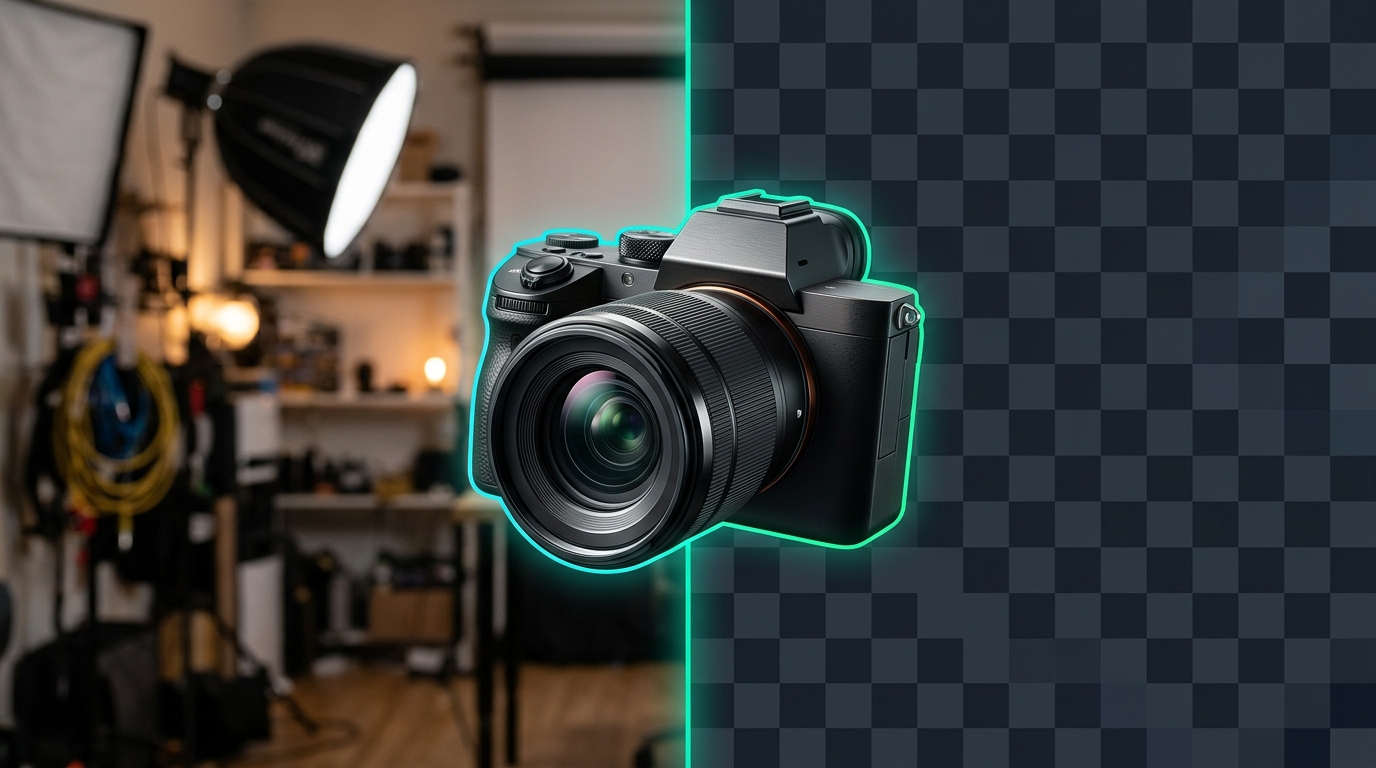
Automated visual pipelines almost always hit the same bottleneck: turning raw product shots, portraits, or AI-generated renders into clean, 32-bit transparent PNGs without white halos, jagged hair edges, or unpredictable per-image SaaS bills.
If you run open-source segmentation locally, you end up managing PyTorch weights, ONNX runtimes, and GPU cold starts inside bloated containers. If you rely on legacy consumer background-removal APIs, per-cutout costs quickly climb to $0.07–$0.23 per image under rigid monthly credit tiers. In this guide, we will build a production transparent PNG generation pipeline powered by BiRefNet and RMBG-2.0 over a single pay-as-you-go REST API—plus browser tools like the Transparent Image Maker and agentic workflows via Lumoz MCP.
Why Traditional Background Removal Pipelines Break in Production
Teams building e-commerce catalog ingestion, SaaS avatar builders, or programmatic ad renderers typically run into three failure modes when shipping transparency pipelines:
- The diffusion checkerboard trap: Prompting a standard text-to-image model for a "transparent background" usually causes the model to paint a literal gray-and-white checkerboard pattern into RGB pixels rather than producing an alpha channel. Separating generation from segmentation produces far cleaner masks.
- Legacy U²-Net edge artifacts: Self-hosted tools built on older U²-Net weights (such as default
rembgsetups) frequently leave bright background fringes around flyaway hair, fur, knitted fabrics, and translucent glass bottles. - Infrastructure vs. unit economics: Hosting BiRefNet yourself requires GPU memory, batch queueing, and autoscaling; meanwhile, traditional SaaS cutout APIs charge high per-credit rates with credits that expire every billing cycle.
BiRefNet, RMBG-2.0, and SAM 3: Choosing the Right Cutout Engine
Modern background removal relies on high-resolution bilateral reference architectures (BiRefNet) and commercially tuned segmentation checkpoints (RMBG-2.0), while zero-shot foundation models like SAM 3 handle multi-object masking in complex scenes. Here is how the main options compare for developer pipelines:
| Option / Provider | Underlying Architecture | Cost per Image | Alpha & Format Support | Best Fit |
|---|---|---|---|---|
Lumoz Background Remover (remove-background) |
RMBG-2.0 / BiRefNet | $0.005 / run | 32-bit RGBA PNG, WebP, JPEG; solid & blur presets | E-commerce catalogs, portraits, logos, and SaaS pipelines |
Lumoz SAM 3 (sam-3) |
Segment Anything Model 3 | $0.008 / run | Zero-shot subject & region masks | Isolating specific objects inside multi-subject scenes |
| Serverless Bria RMBG 2.0 (Fal.ai / Runware) | Bria RMBG 2.0 | ~$0.018 / image | RGBA PNG / alpha mask | Single-model serverless inference |
| Third-Party GPU Hosting (e.g., Replicate RMBG 2.0) | Bria RMBG 2.0 | ~$0.058 / run (GPU-second billed) | RGBA PNG | Ad-hoc runs without fixed per-call pricing |
| Legacy SaaS APIs (e.g., remove.bg tiers) | Proprietary | ~$0.070–$0.23+ / image | RGBA PNG | Legacy drop-in integrations |
Self-Hosted rembg / BiRefNet |
U²-Net or BiRefNet | ~$0.0006–$0.001+ compute | RGBA PNG | High-volume batch clusters with dedicated MLOps |
For most developer teams, calling remove-background on LumozAI gives you BiRefNet and RMBG-2.0 edge quality at a predictable $0.005 per image with no GPU management and no monthly subscription—funded from the same pay-as-you-go balance shown on the LumozAI Pricing page.
Step 1: Generate Lossless Transparent PNGs via REST API
Before writing code, grab an API key from your LumozAI API Keys dashboard. The microservice endpoint accepts either a public image URL, a multipart file upload, or a base64 data URI at:
POST https://lumozai.com/api/v1/services/remove-background/runKey request parameters supported by the remove-background schema:
image(required): Source image URL, uploaded file (imageform field), or base64 data URI.background_type(optional, default"rgba"): Set to"rgba"for true alpha transparency,"solid"for studio backdrops, or"blur"for portrait depth-of-field.format(optional, default"png"): Output format—"png"(recommended for 32-bit alpha),"webp", or"jpeg".threshold(optional, default0): Integer alpha sensitivity threshold for edge refinement.async&webhook(optional): Set"async": trueto receive arequest_idimmediately and pollGET /api/v1/services/status/{request_id}or receive a webhook callback.
cURL Quickstart
Run a synchronous background-removal call and inspect the returned transparent PNG URL:
curl -X POST "https://lumozai.com/api/v1/services/remove-background/run" \
  -H "Authorization: Bearer YOUR_LUMOZ_API_KEY" \
  -H "Content-Type: application/json" \
  -d '{
    "image": "https://example.com/product-sneaker.jpg",
    "background_type": "rgba",
    "format": "png"
  }'
A successful synchronous request returns structured metadata alongside the hosted transparent PNG URL:
{
  "status": "success",
  "service_id": "remove-background",
  "request_id": "srv_673d1a9e4c102",
  "output": "https://cdn.lumozai.com/uploads/...",
  "output_type": "image",
  "execution_time": "1.81s",
  "cost": "$0.005",
  "balance_remaining": "$9.99"
}
Python Pipeline: Cutout, SHA-256 Deduplication, and E-Commerce Canvas Framing
In real catalog pipelines, you rarely stop at stripping the background. Marketplace feeds (Shopify, Amazon, WooCommerce) expect consistent square framing, trimmed transparent margins, and deduplication so re-imported SKUs never double-bill. The script below hashes the source file locally, uploads it as a base64 data URI to remove-background, downloads the 32-bit RGBA PNG, trims excess alpha padding, and centers the subject on a clean 2000x2000 transparent canvas:
import base64
import hashlib
import io
import os
import requests
from PIL import Image

LUMOZ_API_KEY = os.environ["LUMOZ_API_KEY"]
ENDPOINT = "https://lumozai.com/api/v1/services/remove-background/run"


def file_sha256(path: str) -> str:
    h = hashlib.sha256()
    with open(path, "rb") as f:
        for chunk in iter(lambda: f.read(8192), b""):
            h.update(chunk)
    return h.hexdigest()


def build_transparent_asset(input_path: str, output_path: str, canvas_size=(2000, 2000), margin=150):
    asset_hash = file_sha256(input_path)
    if os.path.exists(output_path):
        print(f"Cache hit for {asset_hash[:12]} -> {output_path}")
        return output_path

    with open(input_path, "rb") as f:
        b64 = base64.b64encode(f.read()).decode("utf-8")

    res = requests.post(
        ENDPOINT,
        headers={
            "Authorization": f"Bearer {LUMOZ_API_KEY}",
            "Content-Type": "application/json",
        },
        json={
            "image": f"data:image/jpeg;base64,{b64}",
            "background_type": "rgba",
            "format": "png",
        },
        timeout=60,
    )

    if res.status_code == 402:
        raise RuntimeError(f"Insufficient Lumoz balance: {res.json().get('message')}")
    res.raise_for_status()

    data = res.json()
    if data.get("status") != "success":
        raise RuntimeError(f"Cutout failed: {data}")

    png_bytes = requests.get(data["output"], timeout=30).content
    cutout = Image.open(io.BytesIO(png_bytes)).convert("RGBA")

    # Trim empty transparent borders around the subject
    bbox = cutout.getbbox()
    if bbox:
        cutout = cutout.crop(bbox)

    # Fit inside target canvas while preserving aspect ratio
    max_w = canvas_size[0] - (margin * 2)
    max_h = canvas_size[1] - (margin * 2)
    cutout.thumbnail((max_w, max_h), Image.Resampling.LANCZOS)

    canvas = Image.new("RGBA", canvas_size, (0, 0, 0, 0))
    offset_x = (canvas_size[0] - cutout.width) // 2
    offset_y = (canvas_size[1] - cutout.height) // 2
    canvas.paste(cutout, (offset_x, offset_y), cutout)

    canvas.save(output_path, "PNG", optimize=True)
    print(f"Saved {output_path} (cost: {data.get('cost')}, time: {data.get('execution_time')})")
    return output_path


if __name__ == "__main__":
    build_transparent_asset("raw_product.jpg", "sku_1042_transparent.png")
Node.js / TypeScript Async Worker Pattern
For serverless APIs or Next.js background queues handling bulk user uploads, pass async: true (and optionally a webhook URL) so your request handler never blocks while waiting on large images:
const LUMOZ_API_KEY = process.env.LUMOZ_API_KEY!;
const BASE_URL = "https://lumozai.com/api/v1/services";

export async function createTransparentPng(imageUrl: string): Promise<string> {
  const startRes = await fetch(`${BASE_URL}/remove-background/run`, {
    method: "POST",
    headers: {
      Authorization: `Bearer ${LUMOZ_API_KEY}`,
      "Content-Type": "application/json",
    },
    body: JSON.stringify({
      image: imageUrl,
      background_type: "rgba",
      format: "png",
      async: true,
    }),
  });

  if (!startRes.ok) {
    const err = await startRes.text();
    throw new Error(`Lumoz API error (${startRes.status}): ${err}`);
  }

  const job = await startRes.json();
  if (job.output) return job.output; // Returned immediately if sync completed

  const requestId = job.request_id;
  for (let attempt = 0; attempt < 20; attempt++) {
    await new Promise((r) => setTimeout(r, 1500));
    const statusRes = await fetch(`${BASE_URL}/status/${requestId}`, {
      headers: { Authorization: `Bearer ${LUMOZ_API_KEY}` },
    });
    const statusData = await statusRes.json();

    if (statusData.status === "completed") return statusData.output;
    if (statusData.status === "failed") {
      throw new Error(statusData.error || "Background removal failed");
    }
  }

  throw new Error(`Timed out waiting for request ${requestId}`);
}
Step 2: Two-Stage Generative-to-Transparent Asset Workflows
When your application creates net-new UI icons, game sprites, stickers, or marketing product renders from text prompts, chaining a flagship generator with remove-background outperforms single-step transparency prompts:
- Generate on a clean contrasting studio backdrop: Call a high-adherence model from the LumozAI Model Catalog—such as FLUX 1.1 Pro ($0.050/image), Luma Photon ($0.040/image), or FLUX 3 Image ($0.050/image)—with a prompt specifying an isolated subject against a neutral studio background.
- Upscale low-res supplier inputs first (optional): If you are starting from compressed user uploads rather than fresh renders, run them through the AI Image Upscaler before segmentation so edges stay sharp at 4K.
- Extract the 32-bit alpha channel: Pass the generated image URL directly to
remove-background($0.005/run). - Convert to lossless WebP or AVIF for web delivery: Chain LumozAI's free
image-convertermicroservice ($0/run) to shrink transparent PNG payloads for production CDNs without losing alpha transparency:
curl -X POST "https://lumozai.com/api/v1/services/image-converter/run" \
  -H "Authorization: Bearer YOUR_LUMOZ_API_KEY" \
  -H "Content-Type: application/json" \
  -d '{
    "image": "https://cdn.lumozai.com/uploads/transparent-cutout.png",
    "target_format": "webp",
    "quality": 90
  }'
And when you need to extract one specific object out of a crowded lifestyle photo rather than the entire foreground, invoke SAM 3 ($0.008/run) to isolate the exact target mask.
Step 3: Generate Transparent Assets Directly Inside Claude & Cursor via MCP
If you build web apps inside Cursor, Claude Code, or Claude Desktop, you do not need to write throwaway scripts just to create transparent UI assets. Once connected to Lumoz MCP, your coding agent has native access to both lumoz_generate_image and lumoz_run_microservice under the same API key.
You can ask your agent in natural language:
Generate a matte black mechanical keyboard render on a clean studio backdrop using lumoz_generate_image,
strip its background to a transparent PNG via lumoz_run_microservice (service: "remove-background"),
and save the final cutout to public/images/keyboard-hero.png.
The agent handles generation, alpha extraction, and local file placement in a single turn while keeping billing consolidated on one pay-as-you-go balance.
No-Code Browser Workstations & Production Checklist
If designers, merchandisers, or QA teammates want to test cutouts manually before wiring up the API, they can drop images directly into two turnkey browser apps backed by the same RMBG-2.0 / BiRefNet engine:
- Transparent Image Maker — 1-click 32-bit PNG cutouts plus Crisp White Studio (
#FFFFFF) and Luxury Dark Studio (#0F172A) presets at $0.005/run. - Instant Background Remover — adds Portrait Bokeh Blur alongside transparent and solid studio backgrounds.
Before deploying your transparency pipeline to production, run through this quick checklist:
- Always enforce
format: "png"orwebp: Requestingjpegflattens the alpha channel onto a solid backdrop. - Hash inputs before calling the API: Caching by SHA-256 prevents duplicate charges during bulk catalog syncs.
- Handle HTTP
402and503gracefully: Surface balance alerts early and use exponential backoff orasync: truewebhooks for large batches.
Ready to integrate? Review endpoint examples in the Background Remover API Guide, browse all visual models in the LumozAI Model Catalog, or check pay-as-you-go rates on the Pricing page.
Recommended from LumozAI
How to Connect an AI Image, Video, and Audio MCP Server to Claude and Cursor (2026 Guide)
Connect a single Model Context Protocol (MCP) server to Claude Desktop, Claude Code, and Cursor to generate images, videos, voiceovers, and background music directly inside your coding workflow on pay-as-you-go billing.

How to Swap Multiple Faces in a Video or GIF Without Paying for a Monthly App
Two practical ways to swap multiple faces in group photos, GIFs, and video clips without getting locked into a recurring subscription.

Ultimate Seedream 4.0 Tutorial: How to Use Prompt for Stunning Visuals
Discover how to use Seedream 4.0 on LumozAI to create and edit stunning images. This tutorial covers optimized prompts, step-by-step examples, and tips for photorealistic visuals, posters, and more in seconds.